Volcano Plot
Purpose:
- inspect differential expression for a selected contrast
- prioritize strongly changing and significant features
Inputs:
- one loaded dataset with processed output
- selected contrast
- p-value cutoff
- LFC cutoff
- optional feature highlight search
How to use:
- Open
Volcano Plot. - Choose contrast.
- Set p-value and LFC cutoffs.
- Optionally search/highlight features.
- Click compute.
Outputs:
- interactive volcano plot
- significant-feature table for export
Interpretation tips:
- Upper-left / upper-right regions typically capture strong regulated features.
- Check that highlighted candidates behave as expected under chosen contrast.
- Use same thresholds when comparing across runs.
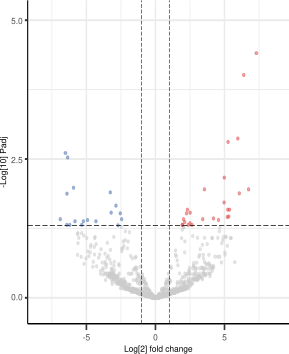
Figure 3. Volcano Plot after compute. Each point is a feature in the selected contrast; the x-axis shows log2 fold change and the y-axis shows statistical evidence as -log10(p-value). Dashed lines mark the selected LFC and p-value cutoffs.
Help: how to read this plot
Features farther left or right have larger effect sizes, and features higher on the plot have stronger statistical evidence. Points in the upper-left and upper-right regions are usually the most interesting candidates. Gray points do not pass the selected thresholds, while colored points pass the significance and direction criteria.