Gene Expression
Purpose:
- inspect expression trajectories for selected genes across datapoints
- compare one or multiple genes in the same view
Inputs:
- one loaded dataset
- one or more selected genes
- selected transformation scale
Available transformations:
- Proteomics/phosphoproteomics: continuous, log-scale, total intensity, median normalization
- RNA-seq: continuous, log-scale, TPM, FPKM, TMM, CPM
How to use:
- Open
Gene Expression. - Search and select one or more genes.
- Choose transformation/scale.
- Inspect line/trend behavior across stages.
Outputs:
- gene-level trend plot
- corresponding table output for selected view
Practical tips:
- For phosphoproteomics, one gene may produce multiple peptide trends.
- Validate stage ordering and replicate naming in your input columns.
- Compare transformed and continuous views before conclusions.
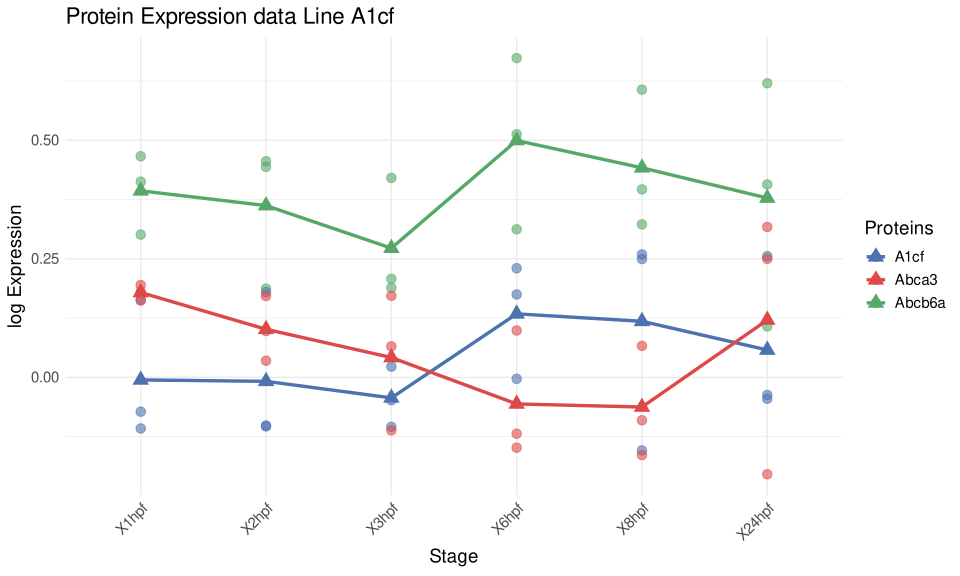
Figure 4. Gene Expression view for selected proteins across stages. Individual points show replicate-level values, and the connected markers summarize the stage-wise trend for each selected feature.
Help: how to read this plot
Use this view to inspect candidate-level behavior after broader analyses such as PCA, heatmaps, or volcano plots. A convincing pattern usually combines a coherent trend across stages with reasonable replicate agreement. For phosphoproteomics, one gene can produce multiple peptide-level trends, so separate lines may represent related but distinct measurements.